Google has just supercharged its Gemini app with a groundbreaking feature called Nano Banana—an AI-powered image editing model that’s making waves across the internet. Launched in August 2025, Nano Banana (also known as Gemini 2.5 Flash Image) offers faster edits, sharper consistency, and more creative control than ever before. If you’re curious about how this update changes the way we edit photos, this article covers everything you need to know.
What is Nano Banana in Gemini?
Nano Banana is an advanced AI image editing model built by Google DeepMind for the Gemini app. Unlike traditional photo editors that require manual effort, Nano Banana lets you describe changes in plain language—and Gemini instantly transforms your images.
This means anyone can:
Change backgrounds
Apply creative filters
Merge multiple photos
Enhance selfies
Create imaginative AI-generated scenes
All in just a few seconds.
Key Features of Nano Banana
1. Consistent Characters & Realism
Nano Banana ensures that the person, pet, or object in your photo looks the same across multiple edits. Whether you change hair color, outfits, or settings, the likeness stays realistic and true.
2. Multi-Step Editing with Prompts
Instead of making one change at a time, Nano Banana supports multi-turn editing. For example, you can:
Change wall color
Add new furniture
Adjust lighting
All without losing earlier edits.
3. Photo Blending and Composition
You can now upload several images and combine them into a single creative output. Imagine blending a vacation photo with fantasy backgrounds or mixing product shots for business use.
4. Speed and Accessibility
Edits appear in under 10 seconds, much faster than traditional tools. Plus, it’s beginner-friendly—no design skills needed. Just type your idea, and Gemini does the rest.
5. AI Watermarking for Transparency
Every image generated with Nano Banana carries a visible watermark plus an invisible SynthID digital watermark. This ensures authenticity while discouraging misuse.
Why Nano Banana is a Game-Changer
Viral Popularity: Over 10 million new users joined Gemini after Nano Banana’s release.
Better than Competitors: Reviews show it outperforms ChatGPT image tools in speed and consistency.
Creative Flexibility: From professional branding to personal selfies, it covers all editing needs.
How to Use Nano Banana in Gemini
Open the Gemini App on Android or iOS.
Upload a Photo you want to edit.
Type a Prompt, such as:
“Make this look like a vintage film photo”
“Change the background to a Paris sunset”
“Turn my dog into a superhero”
Refine with More Prompts until the image matches your vision.
Download or Share directly from the app.
Best Use Cases
Selfies & Social Media: Enhance portraits with pro-level edits.
Creative Storytelling: Transform people into fantasy or historical characters.
Business & Branding: Generate consistent visuals for campaigns.
Fun Experiments: Try trending prompts like “action figure style” or “time-travel photo.”
Conclusion
The Nano Banana Gemini upgrade is more than just a feature—it’s a complete shift in how we think about photo editing. With speed, accuracy, and endless creativity, Nano Banana is setting a new standard for AI-powered design. Whether you’re a casual user or a professional creator, this tool unlocks possibilities that once required advanced software and hours of editing.
Prompts 1
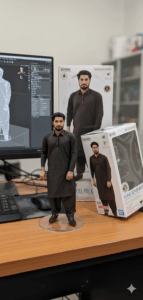
Figurine Details: A 1/7 scale figurine of a character from an unspecified
“picture,” rendered in a realistic style, made of PVC, and placed on a computer desk. It should have a round, transparent acrylic base without text.
Environment Details: The
background should be indoors, and the computer screen should display the brush modeling process of the figurine.
Packaging Details: A BANDAl-style toy packaging box with original artwork and two-dimensional flat illustrations should be placed next to the computer screen. A model packaging box with the character printed on it should be behind the figurine.
Prompts 2
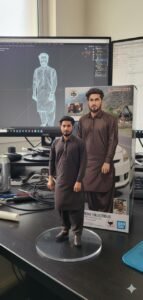
Using the nano-banana model, create a 1/7 scale commercialized figurine of the characters in the picture, in a realistic style, in a real environment.
The figurine is placed on a computer desk.
The figurine has a round transparent acrylic base, with no text on the base. The content on the computer screen is the brush modeling process of this figurine. Next to the computer screen is a BANDAI-style toy packaging box printed with the original artwork., The packaging features two-dimensional flat illustrations.
Please turn this photo into afigure. Behind it, there should be a Model packaging box with the character from this photo printed on it. In front of thebox.on a round plastic baseplace the fiqure version of thephoto I gave you. I’d like the PVC material to be clearlyrepresented.
It would be even better if the background is indoors.